November 19, 2010

Slew of New Business Tools Coming to Ubuntu

By Katherine Noyes, PCWorld

If you use Ubuntu in your company, you're already familiar with its many advantages for businesses. But guess what? You ain't seen nothin' yet, as they say.

Particularly in the wake of the release last month of Canonical's user-friendly Ubuntu 10.10, or Maverick Meerkat, partners have been virtually lining up outside the company's door to help deliver business tools with high-level commercial support.

Boxed Ice, Opsview, Riptano, Unoware, Vladster, Wavemaker, and Zend all joined as Canonical Software Partners in the last few weeks, for example, and will work closely with the development teams that deliver Ubuntu to ensure that installation and operation are of the highest quality.

Then, too, there's Centrify, which has partnered with Canonical to provide security and compliance solutions for Ubuntu enterprise deployments; together, the companies are sponsoring an upcoming webcast, "Ubuntu for the Enterprise: Five Steps to Ensure Successful Adoption."

All in all, it‘s great news for business users of the world's most popular Linux distribution.

"In the past year, we've seen an increase in partners joining our ecosystem, an indication of Ubuntu's worldwide acceptance and growing use in the enterprise," said Matt Asay, COO of Canonical. "We welcome our newest partners and encourage our customers to take advantage of all that they offer."

Linux-Focused Business Tools

So what do these newest partners offer? Here's a quick summary:

* Boxed Ice's Server Density is a server monitoring tool provided as a service that makes it easy to monitor server performance and applications such as Apache and MySQL. E-mail, SMS and iPhone alerts offer notification when things go wrong, and the tool also helps users troubleshoot historical problems and plan future capacity.

* Opsview offers a commercially supported open source solution that delivers business-powered monitoring without the complexity or expense of proprietary software. Among the tool's benefits are a single console for managing and monitoring distributed deployments and a comprehensive view of your physical, virtualized and hybrid cloud infrastructure.

* Riptano's Cassandra is a scalable, high-performance database for online transactions that offers geographic distribution of data across multiple data centers and linear, incremental scalability. Resources can also be added on an as-needed basis.

* Unoware provides enterprise-level business and IT solutions that implement the best standards for SOA, BPM and EAM. They can run entirely on Linux platforms such as Ubuntu Server.

* Vladster delivers Point of Sale and inventory management solutions for small and medium-sized businesses. Its open source IncoPOS, for example, includes a variety of powerful non-free add-ons for easy data visualization and smooth interaction with other management systems.

* WaveMaker software is an open and easy-to-use Web and cloud development platform with visual, drag-and-drop tools that "flatten the Java learning curve" by 92 percent and create standard Java applications with 98 percent less code, the company says. WaveMaker applications are cloud-ready and include built-in support for multi-tenancy and elastic scaling.

* Zend Technologies provides products and services for developing, deploying and managing business-critical PHP applications. Zend products are deployed at more than 30,000 companies worldwide, it says.

* Centrify focuses on securing and auditing access to cross-platform systems and applications through Active Directory. As of last week, Canonical has certified and is distributing Centrify's free Active Directory integration solution, Centrify Express, through its Ubuntu Software Partner Repository. By using Centrify Express, IT professionals can quickly and easily integrate Ubuntu 10.04 LTS or Ubuntu 10.10 servers and desktops into Microsoft Active Directory for centralized authentication and single sign-on.

A Free Webinar for Businesses

Last but not least, Centrify and Canonical's free webinar on Ubuntu in the enterprise will demonstrate how organizations are enabling the broader deployment of Ubuntu by integrating it into their existing Active Directory infrastructure and management processes. The webinar will take place on Dec. 2; registration is now open.

Bottom line from all this? With each passing day, Ubuntu is getting better, not just for consumers but for businesses too. With this ever-increasing list of compelling business advantages, when will you break down and take Linux for a test drive?
Enhanced by Zemanta

November 12, 2010

Join.Me For Remote Assistance

By The Computer Doctor

Most of my readers will recall that I swear by Teamviewer, until they decided to blacklist me for commercial use. Now I spend each day swearing at Teamviewer, but until the company I work for stops shaking in their technologically bereft boots and spend a little money getting remote support software I will have to continue to find my own solutions.

Today I got introduced to Join Me, or more aptly join.me . As their website explains...

Get your people together, without actually getting them together. Just instantly share your screen so everybody's on the same page. No need for a plane, a projector or a sandwich platter. Just gather at join.me.

So what is join.me exactly? It's an impromptu meeting space that happens wherever, whenever. It's getting a second or third pair of eyes on your presentation from across the hall or across the continent. It's sharing your screen instantly with anyone or everyone to get stuff done, quickly.

It's join.me, the last two words in an invitation to collaborate, meet, train, demo or show-off.


To get connected with join.me see the following steps.

1. have your customer enter join.me in their address bar and click on the orange arrow to share


2.
Once the program is done downloading they will get their login number (they may have to choose to run the program before it will start)


3.
Once they give you their nine digit number you should go to join.me as well and enter their number into the join box and click the green join arrow


4.
This should bring up a window showing their desktop. (since I shared from my host desktop instead of my virtual machine you get the hilarious feed back repeating window view of my desktop)


5.
Now to take control of the customers desktop you will click the icon of the mouse on your desktop to ask permission and they will need to accept on their end.


In addition to remote desktop control there is also an instant messenger, file transfer and multi user conference.

Enhanced by Zemanta

November 11, 2010

Formating USB Thumbdrive To Carry Files Larger Than 4GB

By The Computer Doctor

SanDisk Cruzer Micro USB flash driveImage via WikipediaRecently while trying to transfer a virtual hard disc from home to my office I found that I kept getting an error when copying this 5 GB file to my 8 GB flashdrive. In theory I should have had more than enough room since I was only using about 1.5 GB.

Problem: Flashdrives come with the FAT32 file system by default for maximum compatibility.

Solution: Reformat the Drive with NTFS to get past the 4 GB file wall

Problem: When I right click on my USB drive and try to format I don't have an option for NTFS

Solution: Look at the following article by Pranjal...


Ever wondered why you can’t format your USB drives to NTFS. Its because Windows XP by default won’t allow you to do so except format either to FAT or FAT32. But its fairly easy to get over it and enable NTFS files system on your removable devices.

NTFS does allow you encrypt your files with Windows XP’s built in file encryption. It also lets you to add allow and deny permissions on individual files and folders for specific Windows users, something you can’t think of using FAT systems. On the down side NTFS file system won’t get detected in most linux systems, besides that the encryption is pretty much useless. However if you can get over this few demerits NTFS file system is very good for daily usage.

Here is how to format USB drive with NTFS.

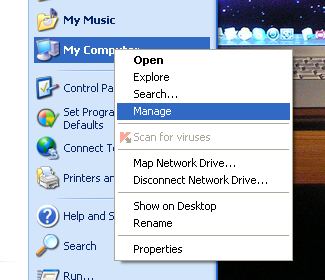
First, plug in your USB device to a free USB port of your computer. Now rightclick on My Computer and select Manage.


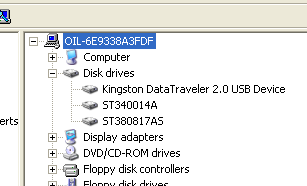
Now after moving to the computer management window, click on the Device Manager and then expand the disk drives, you’ll see your USB drive listed there.


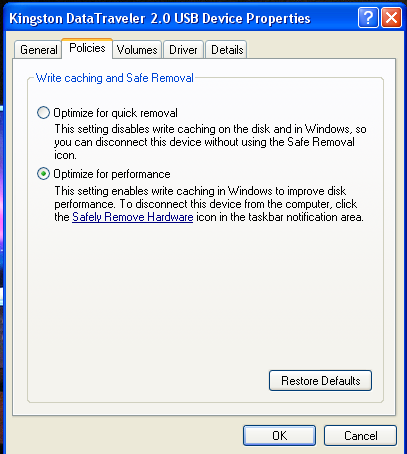
Now rightclick on the USB drive and select Properties. Now go to the Policies tab.


You’ll see two options, one is “Optimize for quick removal” and other is “Optimize for performance”, select the second option “Optimize for performance”. This enables you to format the drive to NTFS.


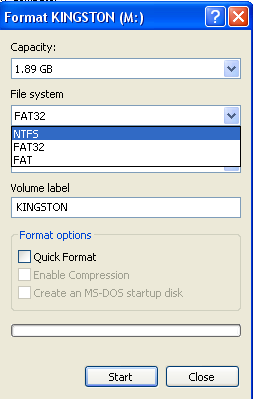
Now click on OK and go to My Computer. Rightclick on the drive and now choose Format. In the file system drop down you’ll see the NTFS format option.
Enhanced by Zemanta

Validating Windows With WGA Behind The Proxy

By The Computer Doctor

Windows Genuine AdvantageImage via WikipediaSo it's behind the proxy time again people and the Doctor has found the key. I'm working with a virtual XP machine and needed to update to SP3 and everyone knows that WGA is the intrusive plague that Microsoft adds to try and ruin the pirates secret sauce.

What does that have to do with the Doctor since he would never ever ever ever ever ever (continue to add ever until it sounds remotely believable) condone piracy? Well my legitimate copy is behind a proxy server.

Problem: Said proxy server does not allow WGA to authenticate to it's home server. WGA also does not allow any settings to add proxy authentication.

Solution: Follow the yellow brick road... which isn't actually yellow... or made of bricks... or even remotely resembles a road.

Prepping Your Box

Step 1: Reboot troubled machine.

Step 2: Hit cancel on the WGA installation box when it pops up.

WGA Manual ActiveX Installation

Step 3: Click the Start button, then Click Run

Step 4: Type: iexplore http://go.microsoft.com/fwlink/?LinkID=39204 then Click OK
You will be prompted to download “LegitCheckControl.cab”

Step 5: Choose Open

Once this completes, a window will open showing two files. “LegitCheckControl.dll” and “LegitCheckControl.inf” Leave this window open for now.

Step 6: Click the Start button, then Click Run

Step 7: Type: system32, then Click OK

(If you are running Windows XP, you may need to click Show Files to allow access to this system directory.)

Step 8: Drag the “LegitCheckControl.dll” file from the window that was open into the “system32” directory folder. If you are prompted to overwrite a file, choose Yes, to overwrite any existing file. (If you are running Vista, you may be prompted to provide administrator permission to complete the action. If so, Press Continue, and allow it.)

Step 9: Click the Start button, then Click Run

Step 10: Type “regsvr32 LegitCheckControl.dll”, and then click ‘OK’.

You should see a dialog saying “DllRegisterServer in LegitCheckControl.dll succeeded.”

Step 11: restart the computer

Step 12: Cancel the WGA once again

Step 13: Go to the following website http://www.microsoft.com/genuine

Step 14: Locate the “Validate Windows” button. Double click on the button and follow the guidance.

Final WGA Installation

Step 15: Reboot the computer once again

Step 16: Do not cancel the WGA installation, but go ahead and run it (continue or next)


Yay! We have conquered the Microsoft insanity machine once again... and did not use one hack or crack.
Enhanced by Zemanta

November 10, 2010

Update To Cloning Hard Drives

By The Computer Doctor

As many of you realize by now, the only way to learn new things is to continually break things and not be satisfied with one solution.

So today I wanted to try using Clonezilla to clone the same source hard drive to a larger drive like I have previously done with GParted.

Let me summarize the steps we used in GParted
1. mount 2nd HD
2. boot up with GParted live cd
3. copy source partitions
4. paste partition to target unallocated space
5. resize target HD to use all the unallocated space
6. unmount source HD
7. make the target HD the master
8. use recovery console or MBR creation utility to make generic MBR
9. boot up with new HD

Now I tried the same thing with Clonezilla doing a disc to disc clone. What I found was interesting. The MBR was copied along with the rest of the disc data. Of course I already knew that the partition was going to be the same as the original and we would have to use GParted or another partition manager to expand the main partition.

Conclusion: You will have to use a minimum of two tools so you should use whatever method seems easiest to you at the time.
Enhanced by Zemanta

November 09, 2010

Using GParted to clone a disc

By The Computer Doctor

So today's project, I am in VirtualBox like always and am working with an XP virtual machine that I use to test ideas (instead of bricking my machine and making my IT guys upset)...

Let me take a moment to pontificate on this last aside. You you may be able to upset your boss a few times and get away with it, you can upset your co-workers on a daily basis and get away with it, you can flip off the truck driver on the way to work and probably get away with it, but you can't continually upset the IT guy and get away with it... they have tricks... like ninjas... they'll get you.


Anyway, so my original XP virtual hard disk is 20 GB in size and I quickly find that although that is enough to get you through to SP2 and an Office install, it is going to run out of space soon with SP3 and a few useful programs. So what I want to do is expand this virtual hard drive to about 70 GB. Unfortunately, neither Sun nor Oracle have created this option to easily help us out, so I had the idea to just clone the drive from one hard drive and restore it to another.

Problems: If I use a straight up cloning software like Ghost or Clonezilla not only will I save the data, but the partition size as well and will have to manually resize the partition when finished anyway.

Solution: If I use GParted I can format and size partitions as well as copy and paste existing partitions.

Here's my step by step directions on how I proceeded.


1. Verify that your existing partition, in my case sda1, is showing up in GParted.


2. Find the second "target" partition, in my case this is sdb1, and create a new partition table


3. After you create your partition table you should see the whole disc as unallocated space as shown.


4. Now back on the source drive, my example is sda1, you want to right click on the partition and choose copy


5. Back on the target disc, my example uses sdb1, you need to paste the source partition and your screen should look as follows


6. Now click apply and be prepared to wait... a long long time


7. When the copy is done you will see a message as follows


8. Now on the new drive you want to resize it's partition to take up the rest of the unallocated space


9. Now unhook your original hard drive and make your new hard drive the master and reboot your machine.

10. The last step is to fix the MBR (master boot record). I had hoped that the original MBR would be copied, but no such luck. The easiest way to fix the MBR is to boot up to the recovery console and execute FIXMBR. I actually used the Hirens Boot CD and used mini XP and executed mbr 0 /install std to install a standard MBR to my drive.

SHOW STOPPERS
  • Forgetting to disconnect the old hard drive will cause a failure and possible data loss. Windows can not support a second windows.
  • Formatting your new hard drive to NTFS and then pasting your partition from the original may not work. For best results just paste your partition to unallocated space.
  • Not shutting down Windows correctly on the original hard drive before trying to copy will fail every time.
Other than those few hangups, you should now have your new larger hard drive booting up your operating system.
Enhanced by Zemanta

November 08, 2010

Ubuntu to drop X Server for Wayland

By The Computer Doctor


I didn't see this coming: Mark Shuttleworth, founder of Ubuntu backer Canonical, has announced that somewhere down the road, Ubuntu will be switching Ubuntu's base graphics system from the venerable X Windows System to Wayland.

In his blog posting, Shuttleworth wrote: "The next major transition for Unity [Ubuntu's new GNOME-based desktop interface that will be introduced in the next Ubuntu release] will be to deliver it on Wayland, the OpenGL-based display management system. We'd like to embrace Wayland early, as much of the work we're doing on uTouch and other input systems will be relevant for Wayland and it's an area we can make a useful contribution to the project."

That's pretty gutsy. The X Window System, which is the networking windowing system that provides the foundation for almost all Unix and Linux desktops, has been too slow for ages. But no one as big as an Ubuntu has ever said that they were willing to replace X with another windowing system.

Wayland is not an X server nor is it an X Server fork, as has sometimes been said. As the Wayland FAQ states, "It's a minimal server that lets clients communicate GEM (Graphics Execution Manager) buffers and information about updates to those buffers to a compositor. To do this, it uses OpenGL, a high-performance, cross-language, cross-platform graphics applications programming interface (API). Wayland also doesn't require new drivers; it builds on the existing Linux graphics APIs and drivers.

Couldn't Canonical just use X? Shuttleworth admitted they could have, but "We don't believe X is setup to deliver the user experience we want, with super-smooth graphics and effects. I understand that it's *possible* to get amazing results with X, but it's extremely hard, and isn't going to get easier. Some of the core goals of X make it harder to achieve these user experiences on X than on native GL, we're choosing to prioritize the quality of experience over those original values, like network transparency."

You won't need to give up X-based applications though to use Wayland. Shuttleworth also said, "We're confident we'll be able to retain the ability to run X applications in a compatibility mode, so this is not a transition that needs to reset the world of desktop free software. Nor is it a transition everyone needs to make at the same time: for the same reason we'll keep investing in the 2D experience on Ubuntu despite also believing that Unity, with all its GL dependencies, is the best interface for the desktop. We'll help GNOME and KDE with the transition, there's no reason for them not to be there on day one either."

Whether KDE or GNOME will want to join is a still unanswered question. Some users have other concerns.

Shuttleworth concluded, "In general, this will all be fine - actually *great* - for folks who have good open source drivers for their graphics hardware. Wayland depends on things they are all moving to support: kernel modesetting, gem buffers and so on. The requirement of EGL is new but consistent with industry standards from Khronos - both GLES (Graphics Layout Engine) and GL will be supported. We'd like to hear from vendors for whom this would be problematic, but hope it provides yet another (and perhaps definitive) motive to move to open source drivers for all Linux work."

Wayland implements a protocol that allows clients – applications – to communicate with a compositor which, in turn, addresses the hardware via the kernel. The compositor's task is to pass keyboard, mouse, touch screen or similar events, to the addressed clients. The clients update their own windows and only inform the compositor that a window area has changed. The compositor will then render the change on screen – and handle such transformations as the resizing or rotating of a window.

Wayland dispenses with many legacies of the X Window system, which is 25 years old – including the long disused X primitives for drawing lines and patterns, functions for handling fonts and colour tables, and network transparency. Current X Window toolkits can be ported to Wayland – a Qt port is already in development. X11 applications can be used with Wayland if the X Server acts as a Wayland client, uses the Wayland input devices and renders its root window or individual X11 windows via Wayland. Apparently, only relatively few changes are required to enable this functionality.

Wayland was started by Red Hat developer Kristian Høgsberg in 2008. Project development is now coordinated by Freedesktop.org.


Enhanced by Zemanta

November 03, 2010

Google Settles Privacy Lawsuit, Offers Users Nothing

By FoxNews.com

Image representing Google Buzz as depicted in ...Image via CrunchBaseGoogle announced the settlement of a privacy lawsuit Tuesday, and it notified users of their share of the deal: zip.

Last February, Google launched the Buzz service: a Twitter-like offering that lets Gmail users notify their contacts of their recent activity. Shortly after launch, many people were surprised to find that the service lumped all of their contacts together for such notifications -- even people users had written to but hadn't created specific contacts for. And in some cases, those lists were made public.

Many users were promptly displeased, enough so to file a class-action lawsuit. In the settlement, announced via an e-mail to Gmail users Tuesday, the company noted that it had quickly moved to address people's concerns but also announced an $8.5 million commitment to an independent fund that will promote privacy education and policy.

But that money isn't available to individual users, Google stressed.

"Just to be clear, this is not a settlement in which people who use Gmail can file to receive compensation
," wrote Google in the e-mail. "Everyone in the U.S. who uses Gmail is included in the settlement, unless you personally decide to opt out before December 6, 2010."

"We will also do more to educate people about privacy controls specific to Buzz. The more people know about privacy online
, the better their online experience will be," the e-mail explained.

The settlement comes on the same day Google said it would simplify and update its privacy policies, Associate General Counsel Mike Yang said on the company's website.

In a statement following the settlement, Google wrote that "we are satisfied with the agreement and are glad to move forward. We have always been committed to offering users transparency and choice in Buzz and all our products, and will continue to work together with users to provide the best experience possible."

Just don't ask for your cut of the cash.
Enhanced by Zemanta

October 28, 2010

Ubuntu splits from GNOME GUI

By Larry Dignan
Editor in Chief of ZDNet and SmartPlanet as well as Editorial Director of ZDNet's sister site TechRepublic.


Canonical’s Mark Shuttleworth on Monday detailed how Ubuntu will split from the GNOME user interface for Unity, which is its netbook approach. Simply put, Ubuntu will have a custom user interface.

The reaction to various press reports from Computerworld, Ars Technica and others has gone to extremes:

  • First, Canonical could be portrayed as evil because it’s flipping its middle finger to the open source community.
  • Others say that GNOME was hard to work with.
  • And then you get your Unity sniping.

Don’t expect much unity in the open source community over Ubuntu’s very significant change.

The reality: If Ubuntu really wants to be a player on the desktop it will have to have more control over its user interface. Meanwhile, it makes no sense to have a UI for netbooks and PCs. In fact, the UI is everything. And as Apple has shown you can’t really do interface by committee.

Now Shuttleworth acknowledged Ubuntu has a lot of work to do. Ubuntu OS needs to rethink everything from windows management to what the interface should look like. Ubuntu’s decision to go to a UI over GNOME (GNU Network Object Modeling Environment) is risky. However, if you can take a shot at broader adoption you do it. The Ubuntu interface (right) isn’t going to get the masses excited.

In other words, this split from GNOME looks like a solid decision to me. Dell is selling Ubuntu laptops and if Ubuntu wants other PC makers to follow it needs a hot interface. Let’s face it: If the best thing Ubuntu can do is mimic the interface of Windows it will never get beyond the enthusiasts. Show us something innovative via the Unity pragmatism and maybe you’ll sway others to Ubuntu.


Enhanced by Zemanta

October 26, 2010

Update To Broken Raid

IMG_3452Image by Jemimus via FlickrBy The Computer Doctor

So I took a couple of weeks to go over the problem of my RAID disks being offline or half online or ready but no logical discs ect.

My Failure In Understandings:
  • I thought that all 6 drives were the same size, but there were three 9 Gb drives and three 25 Gb drives so I will not be able to have more than three discs in my logical drive
  • I thought that I should be able to configure these RAID arrays from the BIOS or from inside Server 2003 which would be software RAID instead of Hardware RAID
My Confusion In Research:
I had three items that came up during boot time and I didn't know which one I needed to learn about to fix my problem.
  • CH B, SCSI ID: 6 COMPAQ SDT-10000 this was a SCSI zip drive. Irrelevant!
  • Adaptec AIC-7896 this is the card that the hot swap drives plug into. Still not helpful
  • IBM ServeRaid 3h this is the huge almst 20 inches long card that actually controlled all the SCSI items. I needed a live cd from IBM to set this up and now I finally found the component that fixed my problem.
I can't stress enough that Google is your best friend, or as my friend Fred commonly mis-quotes me "Everyone likes Google".

My next problem is I am commonly getting a server management controller error. I'm not that worried though because this is the server that gave the school so many fits to start with, it was free to me and I know that it can probably be fixed given enough research.
Enhanced by Zemanta

October 13, 2010

Broken RAID

By The Computer Doctor

Finally, the moment I've been waiting for, I have my first server.

As many of you who have followed me over the past year know, I inherited five servers from a school who just closed and have been storing them at my friend Fred's house ( see Holy Man Or Hallucinating Ham for the incredible story of Fred laying on of hands ). So I finally picked up the first of those servers to set up at my house and promptly ran into problems.

We started out with a three disc RAID5 logical disc with 17.8 usable GB. I installed sever 2003 and got all the updates. When I got home I did some investigating and found another logical disc with 69.3 GB offline that was available so I promptly brought it online. Finally I decided to try to merge the two logical discs for one combined 6 disc raid array which would probably have given me roughly a 92 GB logical drive.

Now the first 17 GB logical drive is offline and one of the other disc's read critical and I am having to re-install Server 2003. Now it dawns on me that this might be the same server that kept giving the school all the problems in the first place.

So in addition to finishing up preparations for the studio I am having to learn all about this RAID controller to try to repair it.

CALLING ALL GEEKS AND HACKERS: If anyone knows anything about a Adaptec AIC-7896 RAID controller, send me a comment or use the contact us page at the top. I will be researching this on my own until someone helps me, I find the answer or I get tired and move on to a different server.
Enhanced by Zemanta

October 08, 2010

Net Nutrailty

by The Computer Doctor

When the Internet was first invented or rather became available to the general public it was a new medium of information exchange that should be open to anyone that was able to connect.
Now we are on the verge of the Internet Service Providers making special privileges that will enable faster connections to special members which could make connecting to Giant Computer Companies website run faster than perhaps The Computer Doctor, or may even cause search engines to redirect traffic to preferred members or even block traffic to sites that haven't paid the special membership dues.
See this video for an ultra simplistic explanation by the Ninja.


This video is an advertisement for SaveTheInternet.com which also gives you constructive measures to help try to keep net neutrality for us and future generations.


Enhanced by Zemanta

Hex Converter

Hex To ASCII Converter

Hex:
Ascii:


Integer to Byte converter


This is a tool to practice converting between decimal and binary representations. After you have practiced for a while and feel that you know how to do the conversions, take the quiz.
Decimal number to convert:
Binary representation:


Binary number to convert:
Decimal representation: